
AI Assistant for Customer Success
The Salesforce Commerce Cloud and Mixpanel Integration with AppEQ
Unlock Account-Level Product Insights
Request a Demo
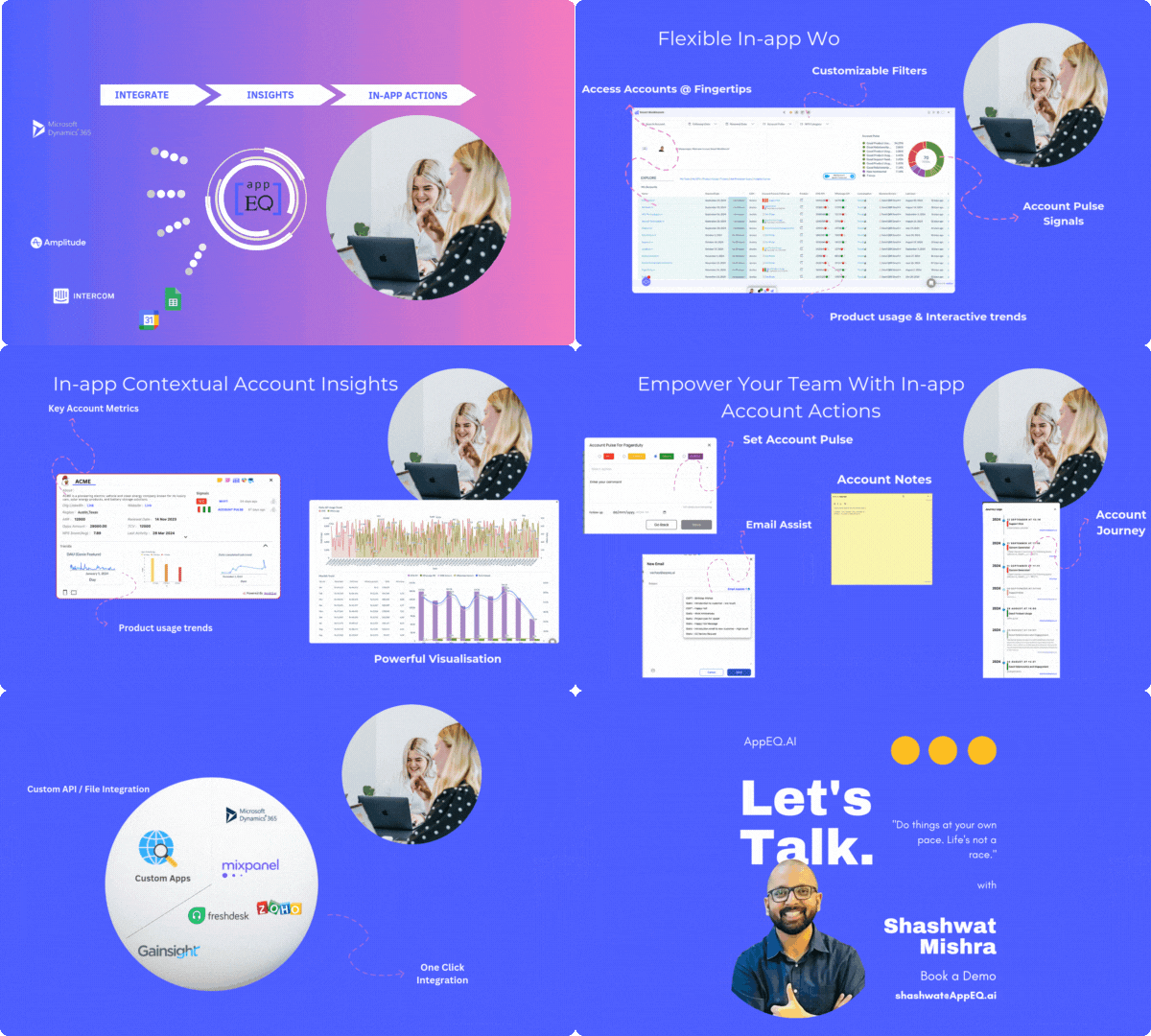
Organizations often store revenue details and account information in Salesforce Commerce Cloud, but understanding product usage at an account level requires deep integration with product analytics tools like Mixpanel. AppEQ allows you to seamlessly connect Salesforce Commerce Cloud and Mixpanel, giving your teams instant access to product usage data alongside revenue insights, enabling a data-driven approach to managing customer success and driving upsell opportunities.
Why Integrate Salesforce Commerce Cloud and Mixpanel
Integrating Salesforce Commerce Cloud and Mixpanel helps businesses align customer success with product analytics, ensuring that account managers can track product usage metrics at the account level, right from within Salesforce Commerce Cloud. This integration enables:
- Visibility into Product Engagement:
- Revenue Alignment:
- Real-Time Updates:
- Unified Dashboard:
- Actionable Insights:
- Red Alerts and Tickets:
-
Always active
The technical storage or access is strictly necessary for the legitimate purpose of enabling the use of a specific service explicitly requested by the subscriber or user, or for the sole purpose of carrying out the transmission of a communication over an electronic communications network.
Preferences
The technical storage or access is necessary for the legitimate purpose of storing preferences that are not requested by the subscriber or user.Statistics
The technical storage or access that is used exclusively for statistical purposes. The technical storage or access that is used exclusively for anonymous statistical purposes. Without a subpoena, voluntary compliance on the part of your Internet Service Provider, or additional records from a third party, information stored or retrieved for this purpose alone cannot usually be used to identify you.Marketing
The technical storage or access is required to create user profiles to send advertising, or to track the user on a website or across several websites for similar marketing purposes.
Understand how customers are using your product.
Correlate product usage with account revenue for better strategic decisions.
Monitor product adoption in real time to prevent churn and identify upsell opportunities.
How AppEQ Connects Salesforce Commerce Cloud and Mixpanel
AppEQ provides a powerful bridge between Salesforce Commerce Cloud and Mixpanel by offering contextual summaries and data syncs across platforms. Here’s how it works:
AppEQ’s Chrome extension shows real-time account statuses from Salesforce Commerce Cloud alongside product usage data from Mixpanel.
Customer Success Reps and Account Executives can easily see which accounts have low engagement or high product usage, enabling timely interventions or sales opportunities.
Receive alerts on product usage anomalies or other key metrics, and automatically flag at-risk accounts within Salesforce Commerce Cloud.
Activate Data and Customer Insights Seamlessly







Steps to Enhance {{mpg_crm}} for Customer Success Teams with AppEQ
01 Connect.
Install the AppEQ Chrome Extension and seamlessly connect it to your {{mpg_crm}} application, enabling real-time data synchronization.
02 Configure.
Configure your {{mpg_crm}} business object details (such as accounts, opportunities, customers, revenue and contracts) and AppEQ’s Workbench and configure metrics, alerts and reports to track account pulse and customer engagement.
03 Consume.
Access workspace with real-time customer insights directly within the tools you use every day, like Gmail, Slack, and more. Stay focused and streamline your workflow without the need to switch between different apps to see the data you need.
Key Benefits of
Composable Workbench With Data & Insights From Your SaaS & EnterpriseApplications
Account Health Monitoring
Get a real-time view of Accounts, Opportunities, tickets and more, directly in the apps that you already use using AppEQ Smart Dashboard.
Revenue-Driven Insights:
Align revenue data with product engagement, support tickets or any other metrics for more strategic account management.
Proactive Customer Success:
Use data-driven insights to preempt churn, boost adoption, and unlock cross-sell/upsell opportunities.
Request a Demo
Help Center
Answers to your questions
Get quick answers to common questions about AppEQ’s features, integrations, and benefits.
How secure is the integration between Salesforce Commerce Cloud and Mixpanel using AppEQ?
AppEQ ensures data privacy and security through encryption. You can visit our trust to learn more about our security measures. https://trust.content.appeq.ai/
Can I customize the data I want to sync between Salesforce Commerce Cloud and Mixpanel?
Yes, you can customize the data fields and metrics you want to sync, ensuring that only relevant data is shared between the platforms.
What kind of metrics can I see in AppEQ Smart Dashboard through this integration?
AppEQ allows you to customise metrics that you want to see on your smart dashboard. It also provides pre-configured templates that you can utilise to quickly view industry standard insights and metrics.
More Integrations to power your team
AppEQ helps to get seamless data and insights @fingertips in your CRM
SurveyMonkey
Get NPS and Customer Survey to understand customer sentiments

Zendesk
Get Helpdesk data to understand open issues and queries from your accounts

Stripe
Understand invoices and payment status easily within the CRM

Google Spreadsheet
Combine Adhoc data with your CRM
Explore More Integrations
 100vw, 750px" /></p>
</div>
</main>
<footer id="site-footer" class="site-footer">
<nav class="site-navigation" aria-label="Footer menu">
<ul id="menu-footer-menu-right" class="menu"><li id="menu-item-25184" class="menu-item menu-item-type-taxonomy menu-item-object-category menu-item-25184"><a href="https://content.appeq.ai/category/teams/customer-success/">Customer Success</a></li>
<li id="menu-item-25185" class="menu-item menu-item-type-taxonomy menu-item-object-category menu-item-25185"><a href="https://content.appeq.ai/category/teams/sales-collaboration/">Sales</a></li>
</ul> </nav>
</footer>
<!-- Consent Management powered by Complianz | GDPR/CCPA Cookie Consent https://wordpress.org/plugins/complianz-gdpr -->
<div id="cmplz-cookiebanner-container"><div class="cmplz-cookiebanner cmplz-hidden banner-1 bottom-right-view-preferences optout cmplz-bottom-left cmplz-categories-type-view-preferences" aria-modal="true" data-nosnippet="true" role="dialog" aria-live="polite" aria-labelledby="cmplz-header-1-optout" aria-describedby="cmplz-message-1-optout">
<div class="cmplz-header">
<div class="cmplz-logo"></div>
<div class="cmplz-title" id="cmplz-header-1-optout">Manage Cookie Consent</div>
<div class="cmplz-close" tabindex="0" role="button" aria-label="Close dialog">
<svg aria-hidden="true" focusable="false" data-prefix="fas" data-icon="times" class="svg-inline--fa fa-times fa-w-11" role="img" xmlns="http://www.w3.org/2000/svg" viewBox="0 0 352 512"><path fill="currentColor" d="M242.72 256l100.07-100.07c12.28-12.28 12.28-32.19 0-44.48l-22.24-22.24c-12.28-12.28-32.19-12.28-44.48 0L176 189.28 75.93 89.21c-12.28-12.28-32.19-12.28-44.48 0L9.21 111.45c-12.28 12.28-12.28 32.19 0 44.48L109.28 256 9.21 356.07c-12.28 12.28-12.28 32.19 0 44.48l22.24 22.24c12.28 12.28 32.2 12.28 44.48 0L176 322.72l100.07 100.07c12.28 12.28 32.2 12.28 44.48 0l22.24-22.24c12.28-12.28 12.28-32.19 0-44.48L242.72 256z"></path></svg>
</div>
</div>
<div class="cmplz-divider cmplz-divider-header"></div>
<div class="cmplz-body">
<div class="cmplz-message" id="cmplz-message-1-optout"> <br />
<br />
This website uses cookies to ensure you get the best experience on our website.</div>
<!-- categories start -->
<div class="cmplz-categories">
<details class="cmplz-category cmplz-functional" >
<summary>
<span class="cmplz-category-header">
<span class="cmplz-category-title">Functional</span>
<span class=)